Tools We Built
for Better Production.
In-house Tools by O:BRICKS
Not products we sell —
these are the internal tools we built and use ourselves to ship better content faster.
WHY IN-HOUSE
Why We Build Our Own Tools
Built by the people who use them daily — focused on what production actually needs.
Workflow-First Design
Because we use them every day, we build features the market doesn’t offer when production truly needs them.
Role-Based Security
Role-based access (admin, reviewer, viewer) keeps each project secure at the project level.
Repetitive Work Automated
Automate proofing, review, and schedule tracking — freeing people to focus on creative work.
Continuous Improvement
Field feedback ships immediately — the tools evolve alongside us.
OUR TOOLS
Our In-house Tool Lineup
Three tools that connect video review, document proofing, and schedule management into one flow.
TOOL 01
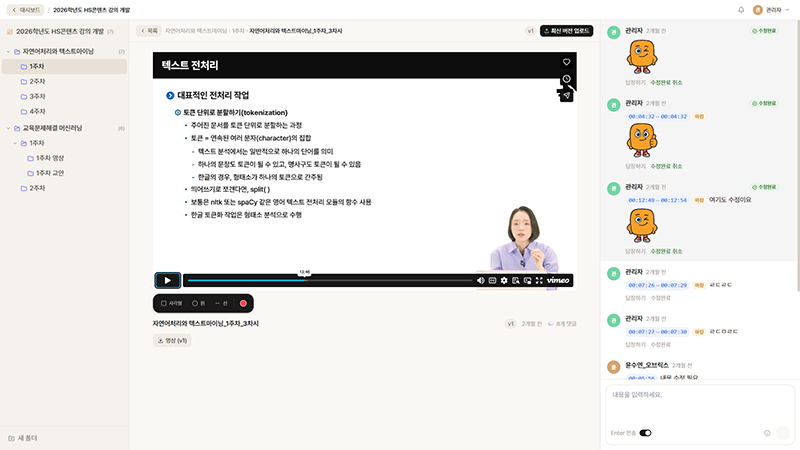
OBIVIEW
Video Review Collaboration System
Pin comments to exact moments of a video and compare versions side-by-side. Role-based access and project hierarchy let many reviewers collaborate safely.
- Timecode-pinned comments
- Role-based access (admin / reviewer / viewer)
- Project & folder hierarchy
- Version-by-version video comparison
TOOL 02
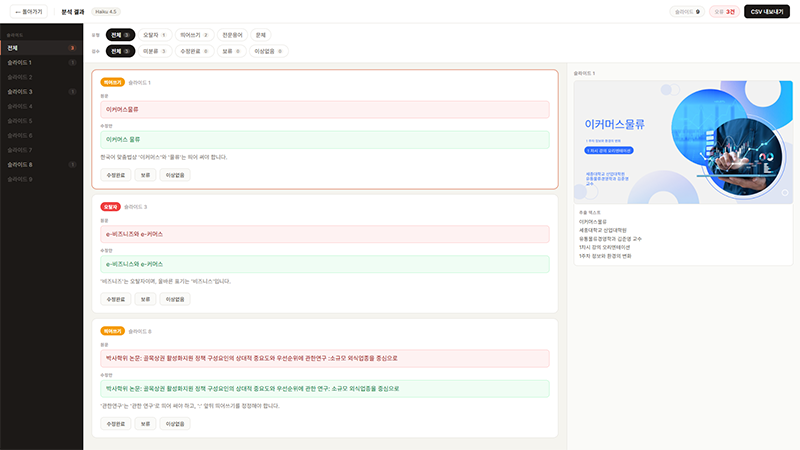
DeckDoc
PPT Auto-Correction Tool
Extract text from dozens or hundreds of PPT slides at once and auto-check typos, spacing, and notation consistency — catching the repetitive errors humans miss.
- Bulk PPT text extraction & inspection
- Typo & spacing checks
- Terminology & notation consistency
- Auto-generated review reports
TOOL 03
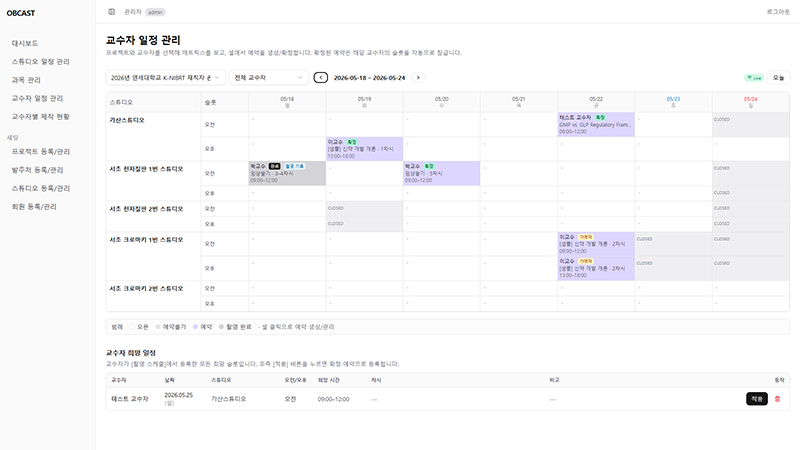
OBCAST
Production Schedule Management
Manage schedules, deliverables, and progress around each project. Permission-separated access lets internal teams and external partners share only what they need.
- Project-centric data model
- Real-time progress sharing
- Permission-separated access control
- Schedule & deliverable tracking
IMPACT
The Difference Our Tools Make
When workflow is automated by in-house tools, clients feel the difference in every project.
Faster Review Cycles
Timecode comments and version compare cut review rounds — stabilizing production timelines.
Higher Text Accuracy
DeckDoc auto-checks catch typos and notation issues early — raising final content trust.
Visible Schedules
OBCAST shares real-time progress — clients see exactly where each project stands.
Smoother Collaboration
Data flows across tools — video, docs, and schedule all live in a single workflow.
Secure Access Control
Role-based access cleanly separates external and internal assets.
Automated Repetition
Automate proofing, alignment, and checklists — people focus on judgment and creativity.
Consistent Quality
Terminology and notation checks plus review reports keep quality consistent across projects.
Data-Driven Improvement
Accumulated review and schedule data reveal repeat bottlenecks — driving continuous improvement.
Experience the Difference Our Tools Make
Workflow precision becomes project quality. Reach out if you have content to build together.